Custom warning ranges
The warning range is the period, in days, during which you will start receiving notifications that a compliance record expiry or renewal is imminent.
By default, the system will define a warning period of 30 days for any record.
However, your business may need more or less time to manage compliance in certain scenarios.
Say, for example, that there is a considerably longer lead time in gathering information about an asset, which would require much more notice than 30 days to prepare a compliance record.
Alternatively, it may be the case that you wish to only receive notifications and be made aware of expiry dates for other compliance records in a much shorter timeframe, as they are considered relatively simple to fulfil.
By adding a custom warning range, you can specify, in days, the exact timeframe for notifications to be sent prior to a given compliance record's expiry date.
Configuring custom warning ranges
Under the given business dashboard, navigate to the Options tab.

Select Edit custom warning ranges.
You should see a list of all of your current custom warning ranges (on first load this list will be empty).
Navigate to the Options tab.
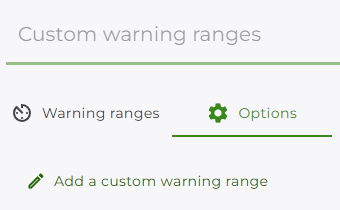
Select Add a custom warning range.
Under Compliance Record Type, search for the compliance record type you wish to configure.
Set the number of days for the custom warning via the Days value.
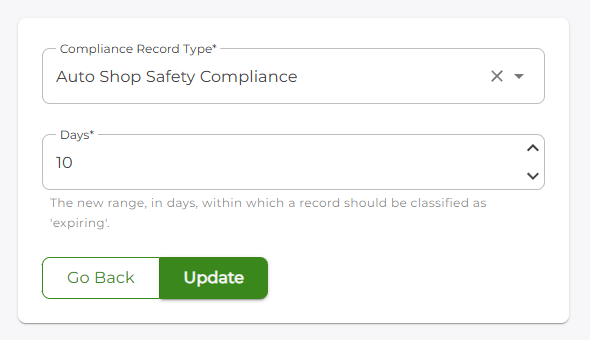
Click the Update button to save the custom warning range.
You should be returned to the Warning ranges tab, which will now display the newly-added warning range entry.
Deleting a custom warning range
Under the given business dashboard, navigate to the Options tab.
Select Edit custom warning ranges.
You should see a list of all of your current custom warning ranges.
Locate the entry you wish to delete and click on the delete icon
 .
.You will be presented with a deletion confirmation; select the OK button to confirm deletion of the entry.