Closing a record
Once a compliance record has had a valid fulfilment placed against it, the record is deemed to have been fulfilled and can now be considered ready to be closed.
Some compliance records may only ever occur once for the lifetime of the asset, for example, a product's warranty registration.
Other compliance records will require renewal of the same record, for example, a safety training certificate that needs to be refreshed every 3 years.
When a compliance record is closed:
The status of the record changes changes from active to archived.
Depending on your preference, the record can be automatically renewed, or permanently closed.
Completing a record
For a given compliance record, select the Options tab.

Select Complete this record.
You will be presented with a confirmation screen, allowing you to configure a renewal of the record, if required:
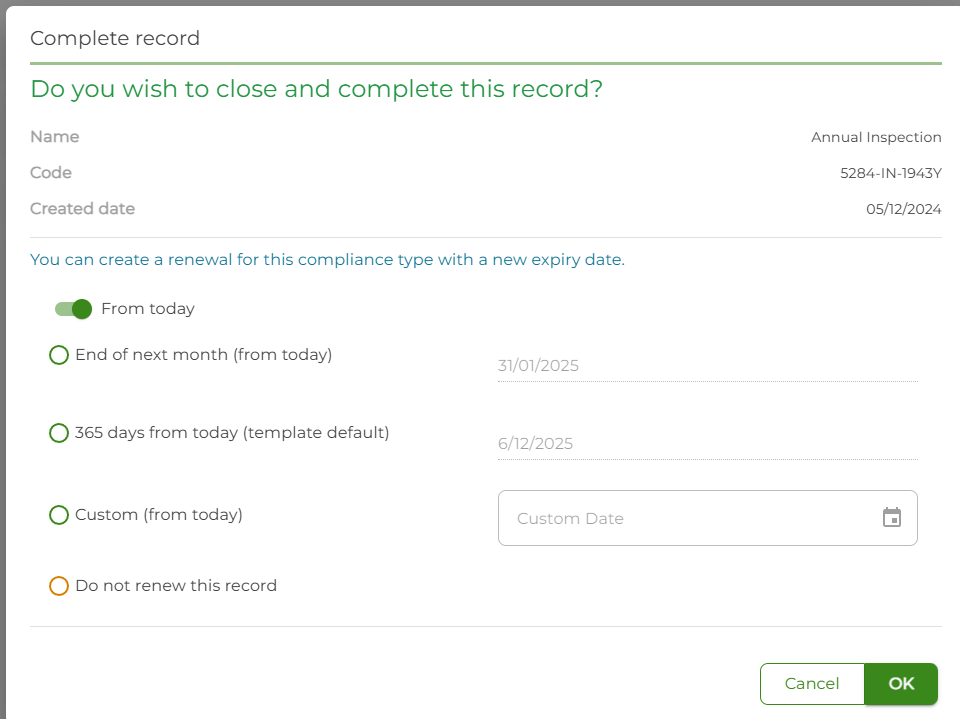
If you do not wish to renew the record, select Do not renew this record.
In our example, the "Annual Inspection" has a renewal period of 365 days (i.e. yearly). As such, it appears as a selectable option.
Where a custom renewal period has been defined for this compliance type, it will appear here with the new date.
At any time you can specify a Custom date by enabling that option and selecting it from the date picker.
When you are ready, select the OK button to close this record (and create the renewal).
Setting the "From" date
When you are prompted to renew the current compliance record, you are presented with two options:
From today
From expiry date
From today
Renewing a record from today will create a new compliance record with an effective date of "today", and an expiry date of (today + days until expiry).
This is suited to compliance scenarios where, for example, a compliance check should be done weekly but no more than 7 days apart - allowing you to set the time frame for the renewed record at 7 days maximum.
From the expiry date
Renewing a record from the expiry date will create a new compliance record with an effective date of the day after the expiry date of the current record, and an expiry date offset by the days until expiry.
This is often useful in scenarios where a compliance record is fulfilled 'in advance' of the expiry but the compliance period for the renewal should not be brought forward.
Re-opening a record
For various reasons you may wish to re-open a record that has been previously closed / archived.
For a given compliance record, select the Options tab.
Select Re-open this record.
You will be presented with a confirmation; select the OK button to confirm re-opening of the compliance record.